Trailing
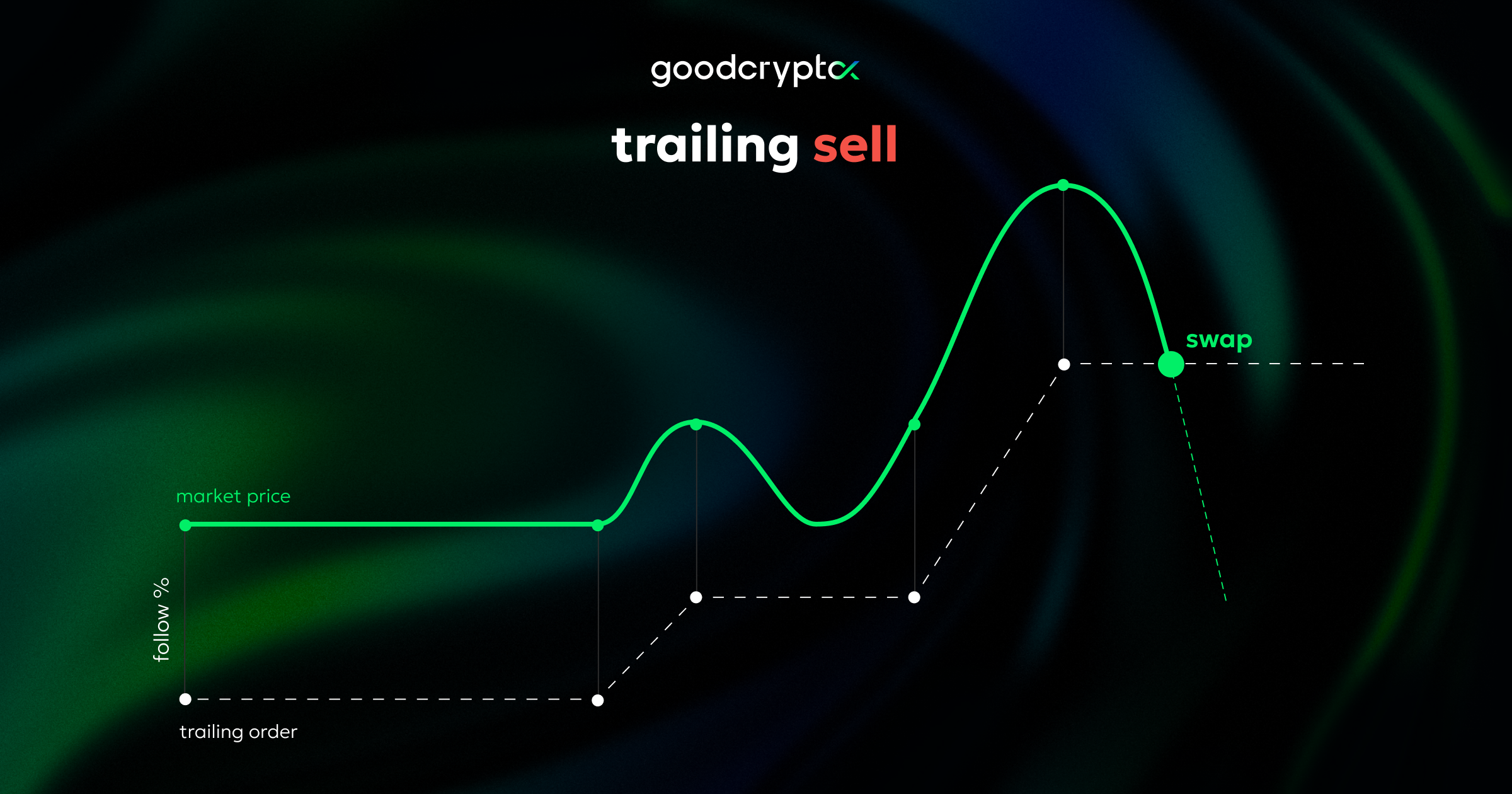
Trailing (or trailing stop) order follows the market price at the chosen distance when it moves in your favor, but stays in place when the price moves against you.
When the market price touches the order, the swap is sent to the exchange.
Trailing order can be used to enter a position (buy coin) at a lower price at the exact moment the price stops falling and starts going up:

Trailing stop can also be used to exit a position (sell coin) at a higher price at the exact moment it stops growing and starts falling:

Setting up trailing buy order
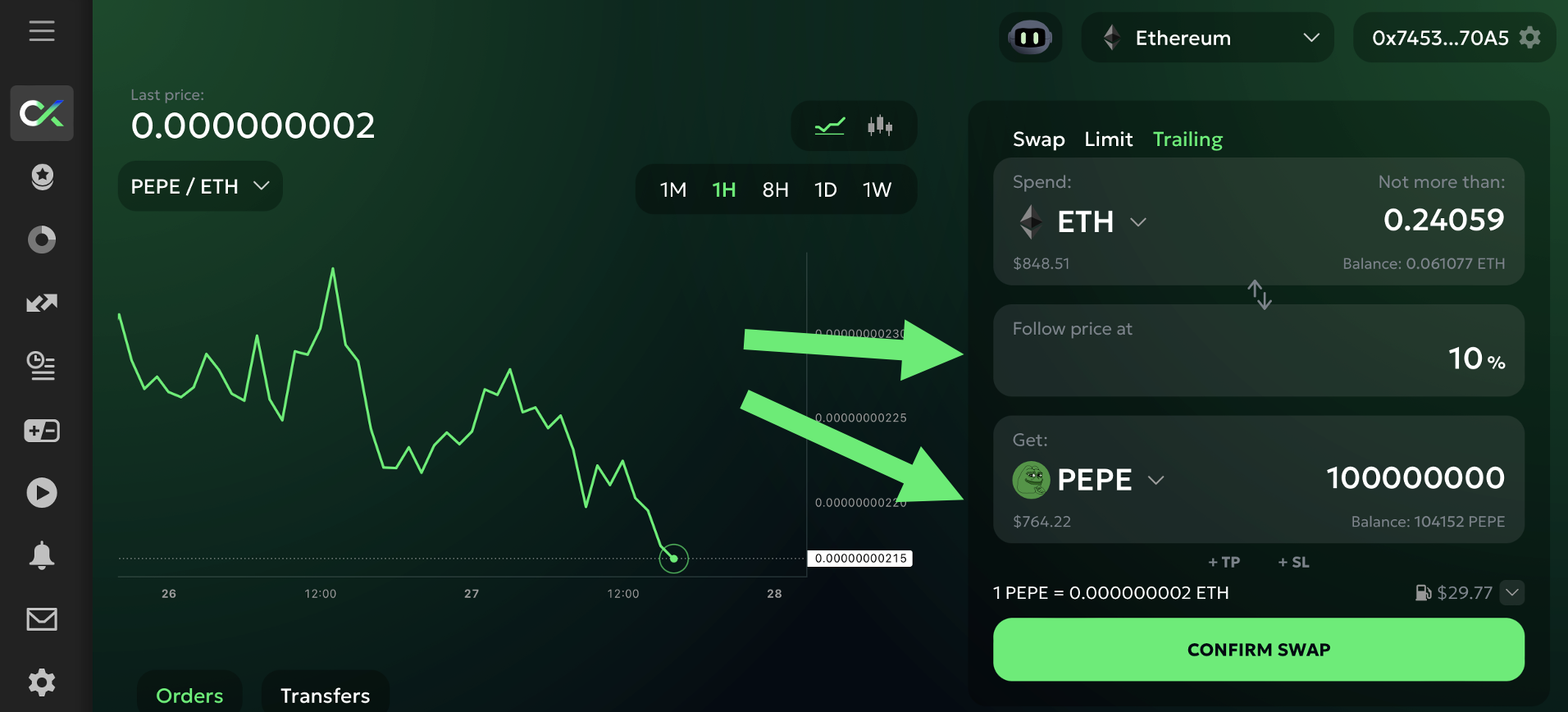
trailing buy orderTo set up a trailing buy order, enter the coin you want to buy into the 'Get' field and choose the distance that you want your order to follow the market price at:

In this example I'm buying 100m PEPE with a 10% follow distance. This means that my order will initially be placed 10% above the current market price. If the price moves lower (PEPE becomes cheaper), the order will move lower automatically (to keep it at 10% from the new, lower market price).
If the price will rise, the order will not move. This means that it will be triggered when the price rises 10% from the lowest point it reaches after I create the order.
The worst case scenario in this example is that the price will rise 10% immediately after I create the order. In this case I will buy PEPE at 10% higher than I could have bought at if I sent a swap order instead.
The amount in the 'Spend' field reflects this worst case scenario - that's why it says 'Not more than:'. That's the amount you'll spend if the price goes against you (rises) right away and never moves in your favor. If the price goes lower even a bit - you'll spend less.
To ensure that I will buy cheaper than the market price at the time of the order creation, I need the price to fall 10% or more.
Keep the above in mind when choosing your 'Follow price at' percentage: you need to set it high enough so that the order will not be triggered by the short-term market movements. But also not too high - since it will increase the probability that the price never moves in your favor enough.
The best 'Follow price at' distance will depend on the volatility of the coin you are buying and the general market volaitilty at that moment. More volatile coins and more volatile market generally require higher 'Follow price at' percentage.
Setting up trailing sell order
trailing sell orderTo set up a trailing sell order enter the coin you want to sell into the 'Spend' field and choose the distance that you want your order to follow the market price at:

Note, that the chart shows 'Get'/'Spend' (ETH/PEPE) price by default. Switch it manually to 'Spend'/'Get' (PEPE/ETH) for a more intuitive order setup (switching the chart does not affect the order, but makes it easier to understand the setup):

In this example I'm selling 100m PEPE with a 10% follow distance. This means that my order will initially be placed 10% below the current market price. If the price moves higher (PEPE becomes more expensive), the order will move higher automatically (to keep it at 10% from the new, higher market price).
If the price will fall, the order will not move. This means that it will be triggered when the price falls 10% from the highest point it reaches after I create the order.
The worst case scenario in this example is that the price will fall 10% or more immediately after I create the order. In this case I will sell PEPE at 10% lower than I could have sold at if I sent a swap order instead.
The amount in the 'Get' field reflects this worst case scenario - that's why it says 'At least:'. That's the amount you'll get if the price goes against you (falls) right away and never moves in your favor. If the price goes higher even a bit - you'll get more.
To ensure that I will sell higher than the market price at the time of the order creation, I need the price to rise 10% or more.
Keep the above in mind when choosing your 'Follow price at' percentage: you need to set it high enough so that the order will not be triggered by the short-term market movements. But also not too high - since it will increase the probability that the price never moves in your favor enough.
The best 'Follow price at' distance will depend on the volatility of the coin you are selling and the general market volaitilty at that moment. More volatile coins and more volatile market generally require higher 'Follow price at' percentage.
Trailing Start (optional)
By default, trailing orders start following the market price immediately after you confirm them.
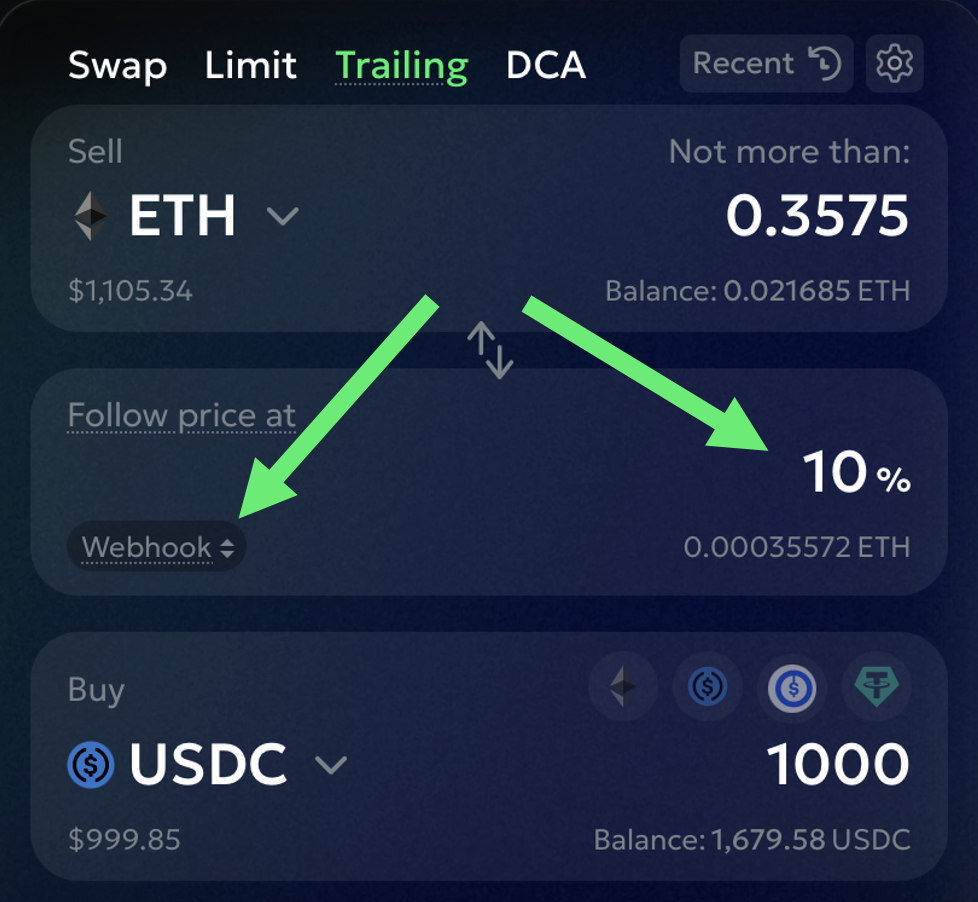
However, you can choose when your order starts trailing after you create it. In the trailing distance field, there is a toggle:
Now – start trailing immediately (default)
At price – start trailing only when the market hits a specific price
Webhook – start trailing only after a webhook alert is received

⸻
Example – Trailing Buy with Price Start
Let’s say you want to start trailing only if ETH drops to $1,500.
You select Start at: Price → $1,500, and set a 5% trailing distance.
This means the trailing logic begins only if ETH hits $1,500 — then it will start trailing 5% above the falling market price.
If ETH bounces, you’ll buy on a 5% rebound. If it keeps falling, your entry price improves.

⸻
Example – Trailing Sell with Webhook Start
You want to start trailing only if a TradingView alert fires — for example, when ETH breaks a resistance line.
You select Start at: Webhook, and set a 10% trailing distance.
When the webhook is received, the order starts trailing 10% below the price — and will sell if ETH falls by that amount after the webhook trigger.

Once the order is created, go to its details to find the Webhook URL you need to point your TradingView alert to (more details in our Webhooks section):

⸻
Once the start condition is met, the trailing behaves exactly as usual: the trigger moves with the price as long as it’s going in your favor, and the order fires when the market reverses by the trailing distance.
Note that the route and its details, such as price impact and expected gas cost, are based on the current market. Your trailing order, however, will execute at some point in the future. Thus, the route, the price impact, and the gas cost might be different at that point.
Before confirming the order, choose whether to attach a Stop Loss and/or a Take Profit to this order.
Once you confirm the swap, your trailing stop order will immediately appear in the 'Orders' list (at this point it lives on our servers only) as 'Trailing' - meaning it is active and is trailing (following) the market price:

Once the trigger conditions are met (the price moves against you by the follow percentage), the order will trigger and send the swap to the exchange. Once it executes, the order status will change to 'Swapped' and will show the actual execution price, actual amount of coins that you received or spent, actual price impact, and gas cost.
Last updated